Show Player is a cart-wall player for live shows. Fill banks of buttons with jingles, stings, beds and walk-ons, then fire them by mouse, keyboard or MIDI, with no lag and no fumbling.
Download for Windows
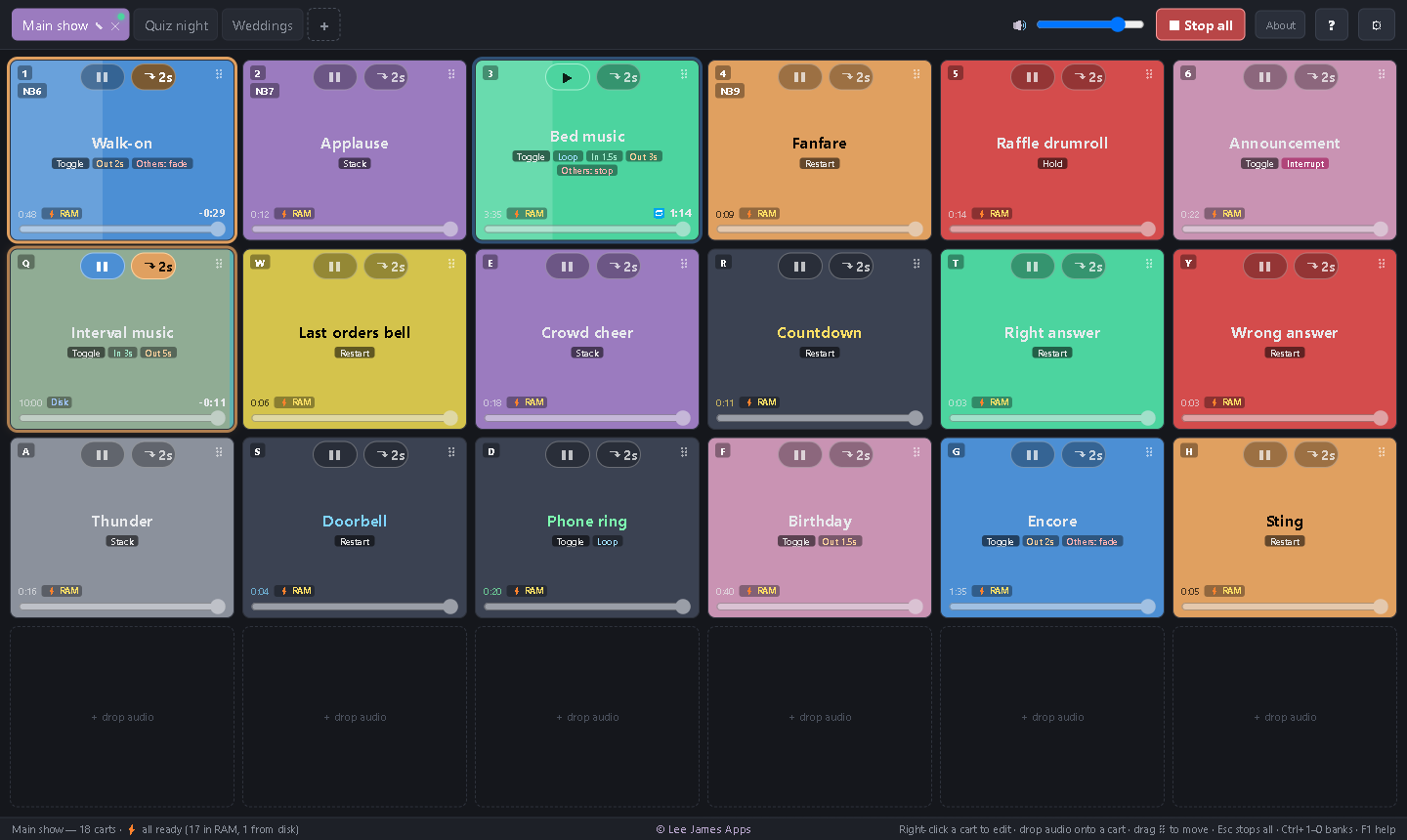
Walk-on and Interval music playing (Interval music has 11 seconds left, so its button is pulsing amber), Bed music paused.
Everything is designed around one thing: when you press a button, the sound is there. No waiting, no surprises halfway through a show.
Tracks load into memory in the background, in every bank, so a press plays straight from RAM. Each button shows ⚡ RAM, so you can check before the show.
Up to 20 banks of up to 8 × 10 buttons. Drag audio straight on, colour the buttons and their text, and drag to rearrange.
Give any button a key or a MIDI pad, note or CC, using Learn. Hotkeys can work even when another app is in front. Hold mode plays for as long as the pad is held.
Toggle, Restart, Stack or Hold, with optional looping. Fade in, fade out on stop, and a one-click fade button on every cart.
Drop an announcement or sting over a song. Everything pauses instantly, then carries on exactly where it was when the interrupt ends.
Long tracks pulse amber in their last 15 seconds and flash red in the last 5, even when they're playing in another bank. No more beds running out by surprise.
Each button decides whether it keeps playing, fades out or stops when you fire something else. Or switch on "one at a time" for the whole wall.
Send everything to a USB interface or mixer input instead of the laptop speakers. If it's unplugged, Show Player uses the default and switches back when it returns.
Every change is saved as you go, so there's no Save button to forget. Keep a .showset file per show, or copy one to another PC.
Shows where the audio has to land on time, every time:
No account and no setup wizard.
Click Download and open the file. It installs in seconds and adds Show Player to your Start menu and desktop.
Drag MP3, WAV, FLAC, OGG, M4A/AAC or Opus files from Explorer onto the buttons. Drop several at once to fill a bank.
Right-click a button for its hotkey, MIDI, colour, mode and fades. Pick your soundcard in ⚙ Settings. Press F1 for the full guide.
Yes. Download it and use it, with no account, no trial and no adverts.
Show Player is digitally signed by Hi-Lite Entertainment Limited (Lee James Apps), so Windows shows a named, verified publisher instead of "Unknown publisher".
No. Once it's installed, Show Player works completely offline. It doesn't check in, phone home or collect anything about you or your shows.
Not yet. Show Player is Windows 10 and 11 only for now.
Any controller Windows sees as a MIDI input: pad controllers, keyboards, or a mixing desk's MIDI out. Notes and CC buttons on any channel can trigger a button, and one pad can be set to Stop all.
By default, tracks up to 7 minutes are loaded into RAM, up to a fifth of your PC's memory (3 GB at most). Switch on "Load everything into RAM" to include long tracks too. Anything not in RAM still plays from disk, pre-loaded and ready.
Yes. Use Save as… to write a .showset file and open it on the other PC. The set stores where your audio is, so keep the files at the same paths, or use Browse… on any button that shows a red "not found" outline.
We count downloads: the date, the version and which page the link was clicked from. Your IP address is turned into a one-way code before it's stored, so it can't be read back. Nothing else is collected.